
Connected ERP modules
Purchasing & Procurement ERP, connected to your business
Manage requisitions, RFQs, supplier comparison, purchase orders, goods receipts and supplier settlement in one connected procurement workflow.
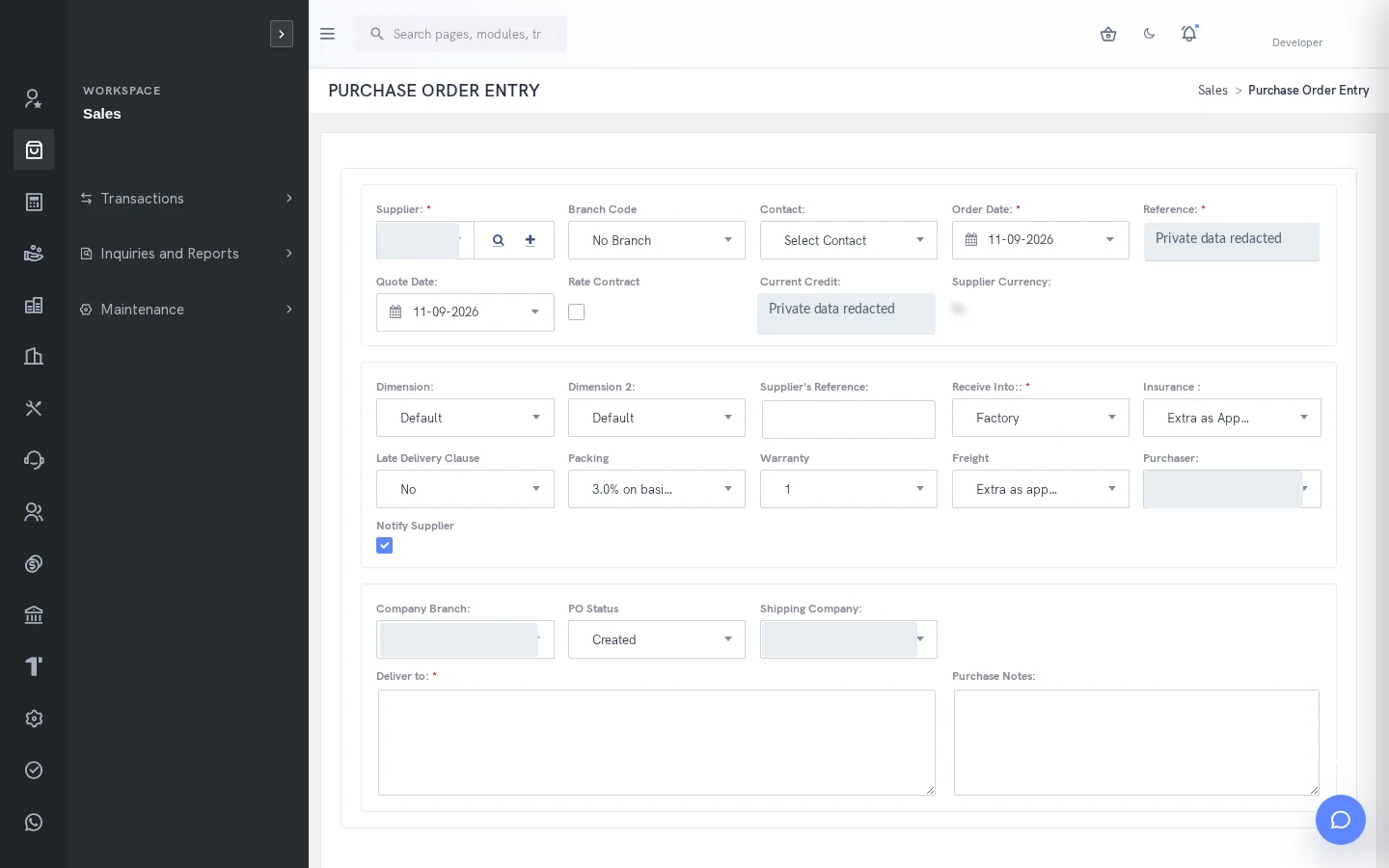
A clearer way to manage purchasing & procurement
Procurement needs more than a purchase-order register. Buyers need to understand the requirement, compare suppliers and preserve the reason for selection. Receiving teams need the outstanding order, and accounts payable needs the receipt and invoice evidence. SERP connects these responsibilities while keeping selection, receipt, billing and payment distinct.
What is purchasing & procurement in SERP?
SERP is an integrated ERP/business management platform from Sybel Micro Solutions. Its purchasing & procurement capabilities support the operational records, inquiries and authorized actions described below. Teams can follow a requirement through the relevant business records instead of interpreting isolated status updates. Availability depends on enabled company functions and the user’s role.
Key capabilities
Supplier records
Maintain supplier identity, registration, addresses, contacts, currency and payment terms. Review tax groups, credit limits and payable accounts with the finance team. Consistent master data reduces repeated interpretation when a requisition becomes an order or when an invoice is checked against a receipt.
Requisitions and RFQs
Start with the business requirement and continue into the authorized RFQ workflow. Select intended suppliers and review the communication before sending it. Supplier submissions and quotation history provide context for comparison. Supplier response links are access-bearing communications and should be shared only with the intended recipient.
Quotation comparison
Review quoted items and commercial terms together. The guide documents a required explanation when the selected supplier is not L1 for every item. Preserving that reason supports review of delivery, suitability or other commercial considerations. Complete the selection and approval process before continuing into purchase-order processing.
Orders, receipts and invoices
Prepare purchase orders with the supplier, location, required date, quantities and unit prices. Record only goods actually received in the GRN workflow. Select eligible receipt lines for invoicing and check the supplier reference, quantities, prices and tax. Configured quantity and price tolerances and duplicate-reference checks support invoice validation.
Supplier settlement and job work
Record supplier payment from the authorized account and allocate it to the intended invoices. Review the remaining payable after allocation. Job work uses dedicated indent, order, gate entry, GRN and supplier-invoice flows. Use those records for outsourced work rather than treating every supplier transaction as an ordinary stock purchase.
How the workflow connects
RequisitionRFQCompare & approvePurchase orderGRNInvoice & payment
Putting the workflow into practice
When several teams request the same material, begin by reviewing the requirement and supplier options before placing an order. When a partial delivery arrives, record actual receipt quantities and leave the remaining order context visible. When an invoice differs from the receipt, investigate the supporting quantities and prices before asking an authorized reviewer to resolve the exception.
Permissions and review points
RFQ progress, supplier response status, purchase-order approval and accounting posting are different states. A GRN establishes receipt, not payment. Invoice tolerance exceptions and pending approvals must be resolved through the appropriate workflow. Supplier messaging and response links involve external communication and require deliberate recipient review.
Questions to bring to your demo
Bring a representative purchasing & procurement requirement and the roles involved. Start with the source record, follow the next transaction and examine the resulting inquiry. Ask the team to show the relevant validation, approval and exception handling with your expected company and location context. This makes it possible to assess the workflow against how your organization actually works.
Review both routine activity and a realistic exception. Identify who enters information, who reviews it and who confirms the final result. Agree which inquiry or report establishes completion, and check the underlying references. This approach creates a useful implementation discussion without assuming that every optional function is already enabled.
Define a reliable handoff between teams
Use the workflow above to agree the reference that passes from one team to the next. The next person should know what the previous action establishes, which details still need review and which record will confirm the result. Retain the company, date and relevant party or item context when investigating a difference. This makes an exception easier to explain than a separate message with no transaction reference.
During implementation, compare the intended procedure with the available entry and inquiry screens. Test a complete record, an incomplete record and a role that should not perform the action. Where approval applies, review pending and completed outcomes separately. The objective is to establish the operating boundaries and evidence of completion for the actual configuration your team will use.
Who uses this module?
Buyers, supplier coordinators, receiving staff and accounts-payable reviewers.
Business value of a connected workflow
A clear chain from requisition to supplier settlement preserves both the commercial selection and physical receipt evidence.
Reporting and operational review
Purchase order, supplier transaction and allocation inquiries help investigate outstanding receipts and supplier balances.
Explore individual functions
A few useful answers
Frequently asked questions
What does SERP purchasing & procurement help teams manage?
Manage requisitions, RFQs, supplier comparison, purchase orders, goods receipts and supplier settlement in one connected procurement workflow.
How should we evaluate purchasing & procurement in a demo?
Use a representative requirement, trace the steps from requisition to invoice & payment, and review the resulting records with the people responsible for each action.
Can every user access these functions?
No. Availability depends on enabled company functions and assigned permissions. Entry, review, approval and administration may require different access.
Can buyers compare supplier quotations?
Yes. The RFQ matrix supports supplier responses and comparison. A reason is required when the selected supplier is not lowest for every item.
Is a GRN the same as a supplier invoice?
No. A GRN records received goods. Supplier invoicing and settlement have separate matching, validation and payment steps.
Which reports help this team review its work?
Purchase order, supplier transaction and allocation inquiries help investigate outstanding receipts and supplier balances.
See how your business connects with SERP.
Bring your processes, priorities and questions. Let’s make the demonstration useful for your team.
Request a Demo →