
One connected platform
SERP AI
AI-assisted business operations with human review and role-based controls. Find ERP information, prepare actions and review BOM proposals in context.
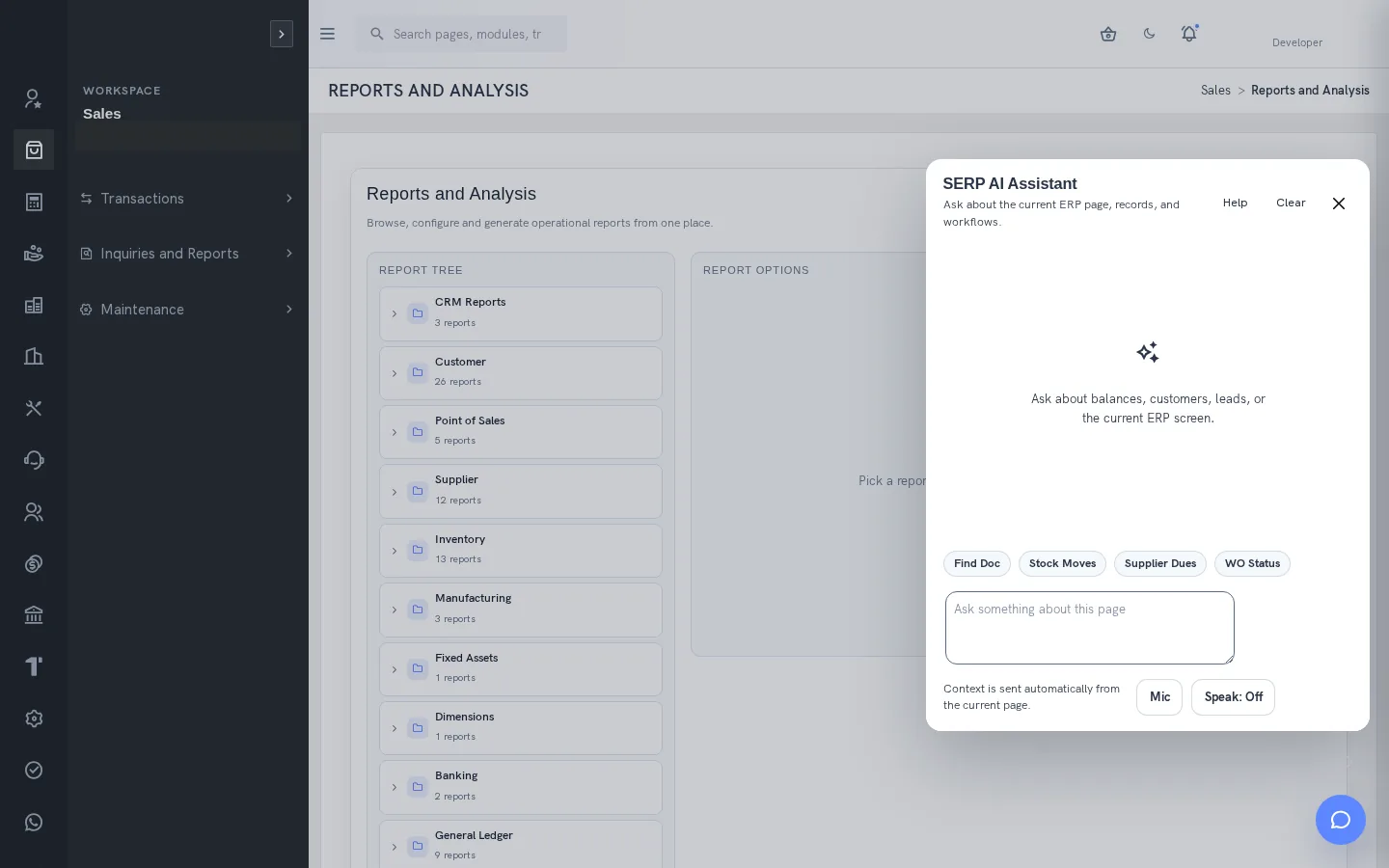
What is SERP AI?
SERP AI brings contextual assistance into the ERP workflow. The assistant can use supported, permission-controlled tools to help users find business information and prepare the next step. It is part of SERP by Sybel Micro Solutions. Its value lies in making the relevant record easier to find while preserving responsibility for business decisions.
Ask with business context
Open the assistant from the page where you are working and ask a precise question. Include an item, supplier, document reference, date range or location when relevant. Current-page context accompanies the request. Supported shortcuts include document search, stock movements, supplier dues and work-order status. Review the references returned before making a decision.
Find operational and financial information
Supported tools include stock availability by location, recent stock movements, overdue customer invoices, customer balance information, supplier payables and open purchase orders. Work-order item status can include production and component requirements. Authorized audit lookup uses restricted audit permissions. A limited result set does not prove that no other records exist; refine the scope when results are ambiguous.
Search documents and prepare forms
ERP document search returns matching transaction references subject to document-type permissions. Supported navigation commands open recognized screens, and form assistance can fill visible fields. Field preparation is separate from saving: inspect values and complete the normal authorized procedure. Screen permissions and validation continue to apply.
Create a CRM lead with explicit confirmation
The AI lead-creation tool requires confirmed contact details, including first name, valid email and mobile, with relevant permission and validation. Optional information can include company, notes and owner. A confirmed request can write the lead immediately. Open the returned reference to verify the record; do not assume a second draft approval screen will appear.
Review AI BOM proposals as an engineer
AI BOM proposals compare item descriptions with existing manufactured-item and kit BOM patterns, then suggest components, quantities, locations and work centres. Engineers review suitability, units and quantities before approval. Only pending proposals can be approved. Approval adds eligible components and records the approver and time; some proposed lines may be skipped. Confidence is a similarity signal, not proof of engineering correctness.
Keep data and decisions under control
The configured AI service may receive prompt context and tool data. Administrators must review provider configuration and access boundaries. Users should avoid credentials and unrelated confidential information in prompts. Navigation help, a read query, a lead write and BOM approval have different effects, so the requested action needs to be understood before confirmation.
A practical assistant workflow
Begin with a bounded question such as stock availability for a specific item and location. Read the answer, follow the source reference and compare the result with the appropriate inquiry. If the next step changes a record, review the intended values and your authority before proceeding. Use this pattern for supplier, customer and production questions without delegating final accountability to generated text.
Evaluate the capability with your team
Bring a representative business question and the people responsible for the source data, review and final action. Ask for the relevant company configuration, permissions and exception handling to be demonstrated. Follow the result back to its underlying transaction or document so the evaluation is based on an observable workflow.
Agree which functions are needed at launch and which depend on later configuration. Review the effect of incomplete data, missing permission and uncertain external outcomes. These details help set useful operating procedures and identify the information that an administrator must maintain.
Give each question a useful scope
For a customer question, include the customer reference and the period or overdue condition that matters. For stock, provide the item and location. For work-order information, identify the item and whether component requirements are relevant. These details help distinguish the desired business answer from a broad list of possible matches. If a result is ambiguous, refine the question rather than treating the first plausible record as the intended one.
Demonstrate different action types separately
A useful AI demonstration includes a read query, a navigation or form-preparation example and, where authorized, a record-changing action. Inspect the source reference after each. In the BOM workflow, examine the proposal while pending and review what approval actually adds. Some lines can be excluded because they are recursive or already present; the resulting count may be smaller than the proposed line count. Check the resulting BOM rather than assuming every proposal line was accepted.
Set expectations for everyday use
The assistant helps users work with supported ERP context, but it does not remove the need to understand the underlying process. Users should know which question they are asking, what result is expected and whether an action will change data. Permission checks, configured availability and human review remain part of the workflow. No guaranteed AI accuracy, autonomous financial posting or fully autonomous engineering decision is promised.
Practical questions this capability can answer
- Can SERP AI read stock availability? Supported tools can return stock by location and recent movement history. Supply an item and location, and verify the source inquiry.
- Does form assistance save a transaction? Preparing fields and saving are separate. Review visible values before the normal authorized save; confirmed CRM lead creation is a distinct immediate-write tool.
- Does AI information stay inside the ERP? Prompt context and tool results can be sent to the configured provider. Company settings, data boundaries and permissions must be reviewed.
A few useful answers
Frequently asked questions
What does SERP AI do?
AI-assisted business operations with human review and role-based controls. Find ERP information, prepare actions and review BOM proposals in context.
Is availability the same for every company?
No. Enabled functions, configuration and user permissions determine availability. Confirm the intended workflow and access during implementation.
Does SERP AI make autonomous engineering or financial decisions?
No autonomous engineering or financial decision-making is promised. Users review source records and proposed values, and authorized business controls remain in place.
Can the assistant create a lead?
Yes, when contact details, permission, validation and explicit confirmation satisfy the supported tool. That action can create the lead immediately; review the returned record.
Can SERP AI read stock availability?
Supported tools can return stock by location and recent movement history. Supply an item and location, and verify the source inquiry.
Does form assistance save a transaction?
Preparing fields and saving are separate. Review visible values before the normal authorized save; confirmed CRM lead creation is a distinct immediate-write tool.
Does AI information stay inside the ERP?
Prompt context and tool results can be sent to the configured provider. Company settings, data boundaries and permissions must be reviewed.
See how your business connects with SERP.
Bring your processes, priorities and questions. Let’s make the demonstration useful for your team.
Request a Demo →