
One connected platform
Analytics & Reporting
Explore operational reports, financial statements and transaction inquiries across SERP, with filters that make the scope of each result clear.
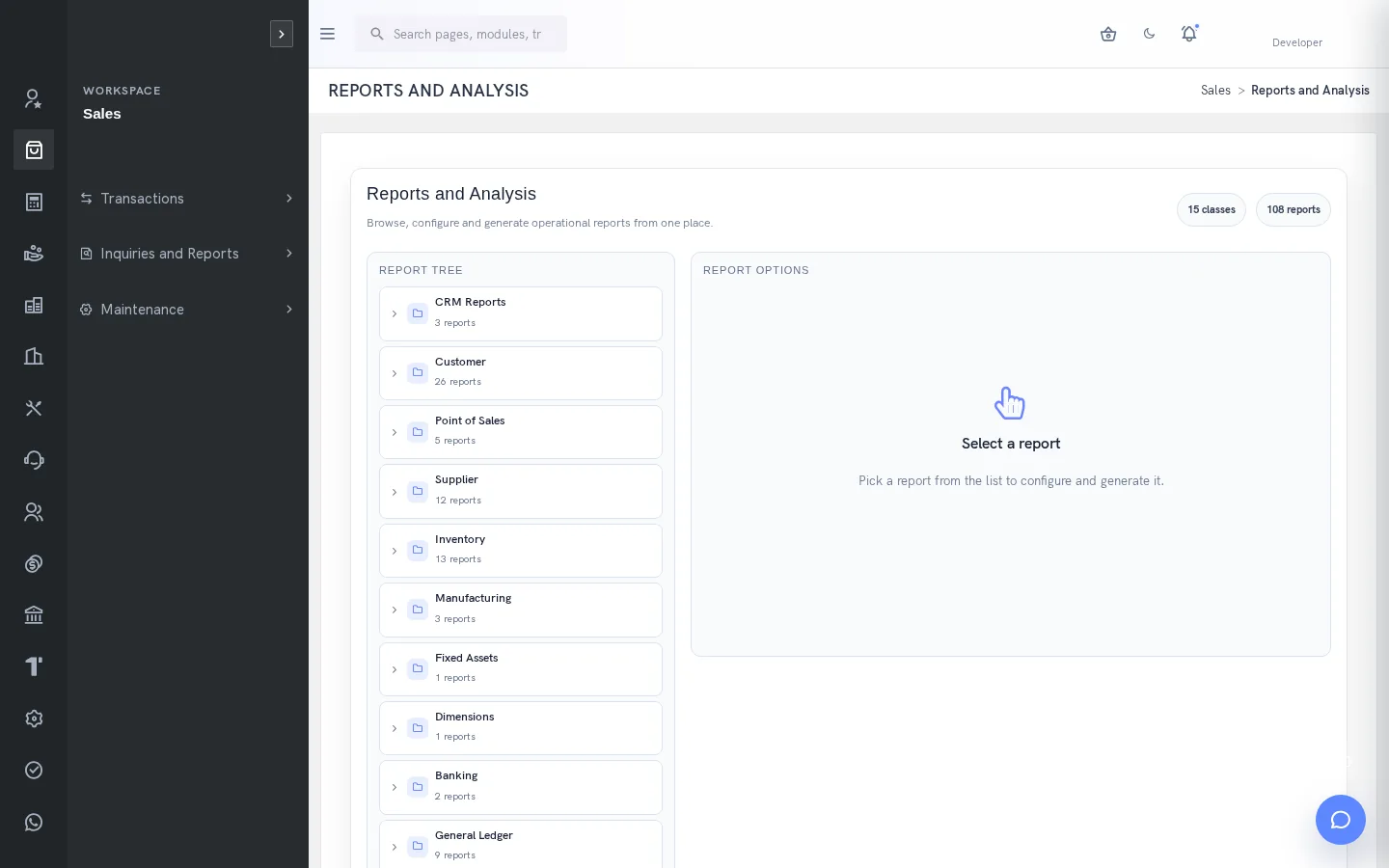
Reports connected to operational records
SERP reporting spans customer, supplier, inventory, manufacturing, finance, HR, projects, services and other enabled areas. Analytical reports help summarize or compare records, while printed orders, invoices and receipts describe individual transactions. Choosing the correct report is the first step toward an answer that a reviewer can explain.
Select the question before the report
Start with the decision: outstanding customer balances, inventory history, production context or a financial statement. Select the relevant report class and check the parameter labels. A document reference range is not necessarily a date range. Similar report names can use different scopes or serve different purposes.
Use consistent filters
Set dates, parties, items, locations, branches or dimensions where offered. Review currency, grouping, sorting and outstanding-only settings before generating output. When two totals differ, compare those choices before treating the difference as a transaction error. A useful report retains enough context for another person to reproduce the question.
Dashboards and drilldowns
Available dashboard views can summarize customers, suppliers, cash flow, overdue activity and other configured information. Follow the related inquiry to understand individual records. Dashboard availability and chart definitions depend on configuration and access; no fixed metric set or deployment-wide report count is promised.
Output and sharing
Use the actual destinations available for the selected report. Formats vary, so do not assume every report supports every export option. Review any email destination and intended recipient before generation. Check title, range and totals before sharing an output, and preserve the underlying filters in the review discussion.
Evaluate the capability with your team
Bring a representative business question and the people responsible for the source data, review and final action. Ask for the relevant company configuration, permissions and exception handling to be demonstrated. Follow the result back to its underlying transaction or document so the evaluation is based on an observable workflow.
Agree which functions are needed at launch and which depend on later configuration. Review the effect of incomplete data, missing permission and uncertain external outcomes. These details help set useful operating procedures and identify the information that an administrator must maintain.
A receivables review that can be reproduced
Start with a customer balance or overdue question and choose the relevant inquiry or report. Establish the company and date context, then review outstanding information for the intended customer. Follow individual invoice references when a balance needs explanation. A receipt may exist without being fully allocated, so the reviewer should check the allocation context rather than infer settlement from money received alone. This connects management reporting with the actual receivables workflow.
Stock and production reporting
Inventory valuation, history and production or BOM information address different operational questions. A location-level stock inquiry helps explain quantities, while a manufacturing inquiry relates components and output to work requirements. When reviewing production, compare the required and manufactured quantities using the relevant work-order context. When reviewing stock, distinguish physical quantities, demand and availability. The report title is a starting point; its filters and source records establish what the answer means.
Financial statements in a consistent scope
Trial balance, balance-sheet and profit-and-loss drilldowns help finance examine account balances and statements. GL inquiry provides the transaction detail behind the summary. Use matching periods, dimensions and currencies when comparing outputs, and investigate the original entries before assuming a report difference is an error. Closing and currency revaluation are controlled operations that change the accounting context; opening a statement does not perform either action.
An operational reporting routine
Agree a repeatable review with the people who use the information. Record which report answers the question, which parameters define the scope and which inquiry will be used for investigation. Review exceptions with the responsible transaction owner rather than simply circulating an unexplained total. Before sharing an output, inspect the title and selected range and verify whether any email option will send externally. Available report destinations vary, so choose the supported output appropriate to the actual report.
Practical questions this capability can answer
- Which financial reports are documented? Trial Balance, Balance Sheet and Profit and Loss drilldowns and GL inquiries are documented, with scope-dependent parameters.
- Can every report export to every format? No. Available destinations vary by report. Review the actual output choices and any email recipient before generation.
- Why can two reports show different totals? Dates, company, currency, grouping, dimensions and outstanding-only filters can differ. Compare those settings before investigating individual transactions.
Detailed feature guides
A few useful answers
Frequently asked questions
What does Analytics & Reporting do?
Explore operational reports, financial statements and transaction inquiries across SERP, with filters that make the scope of each result clear.
Is availability the same for every company?
No. Enabled functions, configuration and user permissions determine availability. Confirm the intended workflow and access during implementation.
Which financial reports are documented?
Trial Balance, Balance Sheet and Profit and Loss drilldowns and GL inquiries are documented, with scope-dependent parameters.
Can every report export to every format?
No. Available destinations vary by report. Review the actual output choices and any email recipient before generation.
Why can two reports show different totals?
Dates, company, currency, grouping, dimensions and outstanding-only filters can differ. Compare those settings before investigating individual transactions.
See how your business connects with SERP.
Bring your processes, priorities and questions. Let’s make the demonstration useful for your team.
Request a Demo →