
Connected ERP modules
India GST ERP, connected to your business
Connect tax configuration, GST inquiries, reporting and authorized E-Invoice and E-Way Bill workflows in SERP.
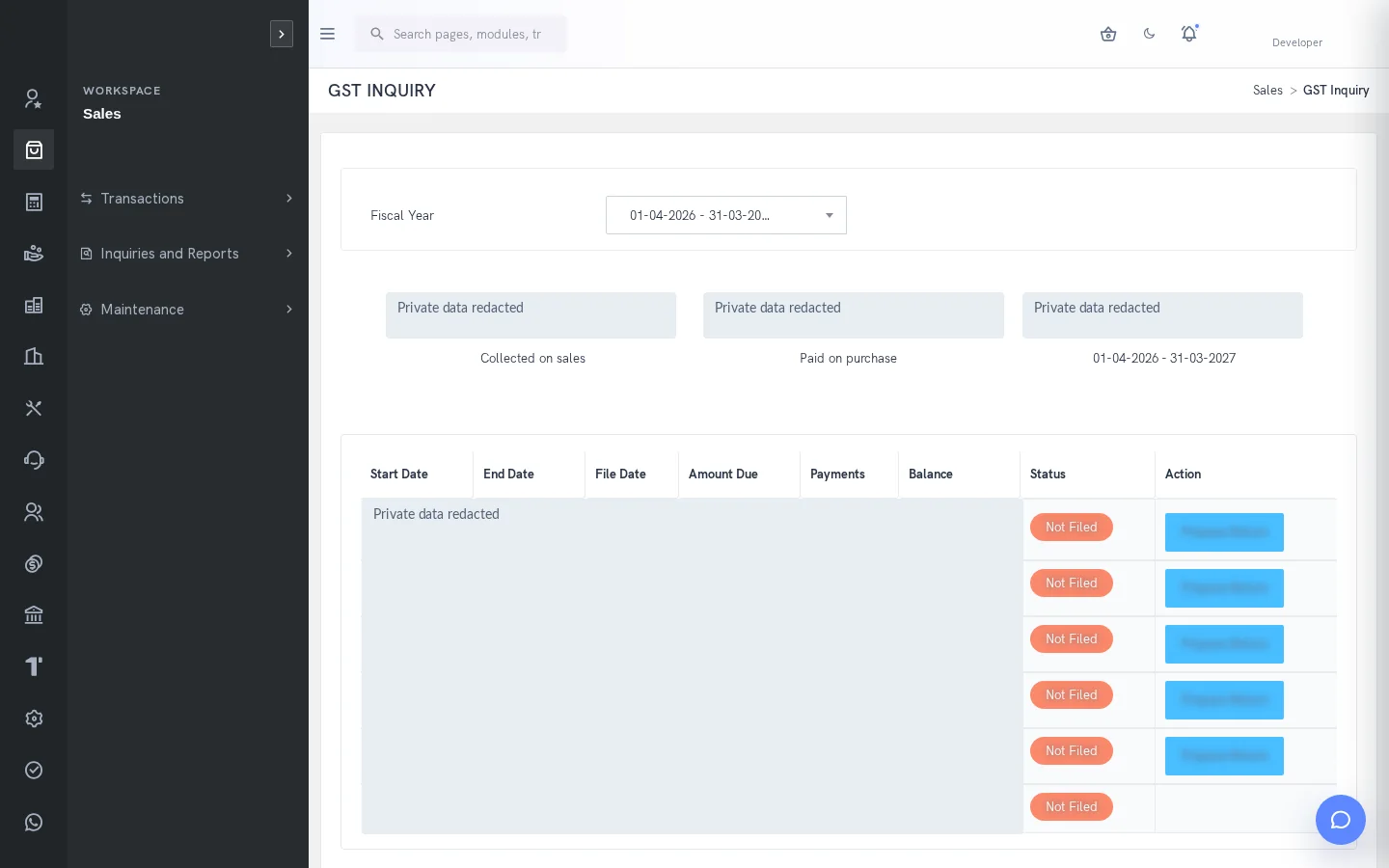
A clearer way to manage india gst
Tax information depends on the quality of party, item and transaction data. SERP provides tax setup, GST inquiries and reporting alongside Sales workbenches for electronic documents. These capabilities support review of recorded information; external acknowledgement and organization-specific compliance responsibilities remain separate.
What is india gst in SERP?
SERP is an integrated ERP/business management platform from Sybel Micro Solutions. Its india gst capabilities support the operational records, inquiries and authorized actions described below. Teams can follow a requirement through the relevant business records instead of interpreting isolated status updates. Availability depends on enabled company functions and the user’s role.
Key capabilities
Tax and party setup
Review tax types, groups, item tax types, registration details, addresses and place-of-supply information. Maintain item HSN or classification details before processing. Consistent master data helps users investigate a tax difference at its source rather than only at report time.
Transaction review
Check invoice dates, party registration, quantities, units, prices, taxable values and tax components against business documents. GST and tax inquiries provide recorded information for the selected scope. Reconcile order, delivery and invoice quantities where an e-document differs.
GST reporting
Available functions include GSTR1 reports and GST-related download and detail views. Select the correct company and reporting period and investigate differences before using output in a compliance process. The presence of a report does not establish automatic filing or universal statutory coverage.
Electronic document workflows
E-Invoice and E-Way Bill workbenches support authorized generation or cancellation using a configured service. Review transaction and transport details before sending. Check the returned acknowledgement and document history, particularly after an uncertain response, before attempting a retry.
How the workflow connects
Verify registrationReview invoiceCheck tax recordsGenerate authorized e-documentConfirm acknowledgement
Putting the workflow into practice
A finance user can investigate an item classification or tax-component difference using the source transaction. A dispatch team can review transport and quantity details before an E-Way Bill action. A supervisor can check the external acknowledgement alongside ERP history rather than treating local processing as final external acceptance.
Permissions and review points
Provider credentials, registration and operation permissions must be configured. Generation and cancellation communicate externally and change external document state. Additional filing or return-center functionality is not inferred from interface names. Confirm current legal obligations separately with the organization’s qualified advisers.
Questions to bring to your demo
Bring a representative india gst requirement and the roles involved. Start with the source record, follow the next transaction and examine the resulting inquiry. Ask the team to show the relevant validation, approval and exception handling with your expected company and location context. This makes it possible to assess the workflow against how your organization actually works.
Review both routine activity and a realistic exception. Identify who enters information, who reviews it and who confirms the final result. Agree which inquiry or report establishes completion, and check the underlying references. This approach creates a useful implementation discussion without assuming that every optional function is already enabled.
Define a reliable handoff between teams
Use the workflow above to agree the reference that passes from one team to the next. The next person should know what the previous action establishes, which details still need review and which record will confirm the result. Retain the company, date and relevant party or item context when investigating a difference. This makes an exception easier to explain than a separate message with no transaction reference.
During implementation, compare the intended procedure with the available entry and inquiry screens. Test a complete record, an incomplete record and a role that should not perform the action. Where approval applies, review pending and completed outcomes separately. The objective is to establish the operating boundaries and evidence of completion for the actual configuration your team will use.
Who uses this module?
Authorized tax reviewers, billing users and finance administrators.
Business value of a connected workflow
Reviewing party, item and transaction tax context before external operations helps isolate validation differences.
Reporting and operational review
GST Inquiry, Tax Inquiry and available GSTR reports/downloads support reconciliation for the selected company and period.
Explore individual functions
A few useful answers
Frequently asked questions
What does SERP india gst help teams manage?
Connect tax configuration, GST inquiries, reporting and authorized E-Invoice and E-Way Bill workflows in SERP.
How should we evaluate india gst in a demo?
Use a representative requirement, trace the steps from verify registration to confirm acknowledgement, and review the resulting records with the people responsible for each action.
Can every user access these functions?
No. Availability depends on enabled company functions and assigned permissions. Entry, review, approval and administration may require different access.
Can SERP generate E-Invoices and E-Way Bills?
Authorized workbenches support generation and cancellation through a configured service. Review the external acknowledgement and ERP history.
Does this include automatic GST return filing?
Automatic filing is not established by the reviewed evidence. Confirm the enabled reporting, download and additional compliance scope for your company.
Which reports help this team review its work?
GST Inquiry, Tax Inquiry and available GSTR reports/downloads support reconciliation for the selected company and period.
See how your business connects with SERP.
Bring your processes, priorities and questions. Let’s make the demonstration useful for your team.
Request a Demo →